Understanding Modern Keyboards Before Buying
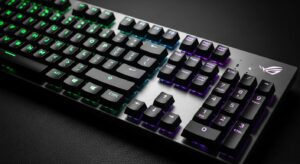
ASUS ROG Strix Scope. Buying a keyboard today is no longer as simple as picking any device with letters on it. Over the last decade, the keyboard market has evolved dramatically. Enthusiasts now discuss keyboard switch types, layouts, sound profiles, and ergonomics with the same seriousness that gamers discuss GPUs. As a result, choosing the right keyboard requires understanding several concepts.
First, keyboards differ widely in design philosophy. Some prioritize gaming performance with fast actuation and high polling rates, while others emphasize typing comfort or portability. A small computer keyboard may fit perfectly on a minimalist desk setup, but it might sacrifice dedicated keys like the number pad. Conversely, full-size keyboards provide maximum functionality but occupy more desk space.
Another key factor is the mechanical switch technology used inside the keyboard. Traditional office keyboards often use membrane switches, which are quiet but less tactile. Mechanical keyboards, on the other hand, use individual switches under every key. These switches deliver faster response times, improved durability, and customizable typing feel.
Finally, connectivity options matter more than ever. Many modern keyboards support wired USB connections, wireless dongles, and Bluetooth simultaneously. The ASUS ROG Strix Scope II 96 Wireless embraces this trend with tri-mode connectivity and advanced wireless technology. Understanding these fundamentals will make the rest of this review much easier to follow.
Types of Keyboards Explained
The phrase “keyboard and types” often appears in search queries because people are confused by the huge variety available today. Broadly speaking, keyboards fall into three main categories.
The first category is membrane keyboards, commonly found in offices and budget laptops. These keyboards use rubber domes beneath each key. They are inexpensive and quiet, but the typing experience often feels soft and imprecise.
The second category is mechanical keyboards, which are extremely popular among gamers and professionals. Each key contains an individual switch that registers input when pressed. Mechanical switches provide tactile feedback, durability, and faster actuation. Many modern keyboards—including the ASUS ROG Strix Scope II—use pre-lubed mechanical switches for smoother typing.
The third category includes magnetic keyboards or Hall-effect keyboards. These use magnetic sensors instead of physical contact points. Magnetic switches allow advanced features such as adjustable actuation and rapid trigger functionality.
Understanding these types of keyboards helps explain why mechanical models dominate the gaming market. They offer precise input, customization options, and longevity that membrane keyboards simply cannot match.
Keyboard Sizes and Layouts
Keyboard layouts are another crucial factor when choosing a keyboard. The keyboard sizes determine how many keys are included and how compact the device is.
Full-size keyboards include the number pad, function row, navigation cluster, and arrow keys. These layouts are ideal for data entry and productivity tasks but take up a lot of desk space.
Tenkeyless (TKL) keyboards remove the number pad while keeping the rest of the keys. Many gamers prefer this design because it frees up room for mouse movement.
Compact layouts—such as 60%, 65%, or 75% keyboards—remove even more keys to create ultra-portable devices. However, some functionality is hidden behind function layers.
The 96% layout, used in the ASUS ROG Strix Scope II 96 Wireless, is an interesting compromise. It keeps nearly all keys found on a full-size keyboard but compresses the layout to save space. According to ASUS, this layout retains full functionality while reducing the width by placing keys closer together.
For users who want both compact design and full functionality, the 96% format offers a compelling balance.
ASUS ROG Strix Scope II 96 Wireless Overview
The ASUS ROG Strix Scope II 96 Wireless is designed as a high-end gaming keyboard that blends premium hardware with versatile connectivity. It targets gamers, content creators, and enthusiasts who want a powerful keyboard without sacrificing desk space.
One of the standout features is the tri-mode connectivity system, allowing users to connect via Bluetooth, 2.4GHz wireless, or wired USB-C. This flexibility means the keyboard can easily switch between gaming PCs, laptops, and tablets.
Another highlight is the keyboard’s hot-swappable switch design. Users can remove and replace switches without soldering, enabling endless customization. Whether you prefer a clicky keyboard sound or a smooth linear feel, the keyboard supports different switch styles.
The keyboard also includes sound-dampening foam and pre-lubed stabilizers. These components reduce unwanted noise and improve typing smoothness. Combined with premium PBT keycaps, the overall typing experience feels refined and professional.
Design and Build Quality
The design of the ASUS ROG Strix Scope II 96 Wireless reflects the typical Republic of Gamers aesthetic—bold yet functional. The keyboard features a sturdy chassis with a matte finish that resists fingerprints and scratches.
A detachable wrist rest adds ergonomic support for long gaming or typing sessions. The keyboard also offers three adjustable tilt angles, allowing users to customize the typing angle based on comfort preferences.
The build quality feels solid thanks to high-quality materials such as PBT double-shot keycaps. These keycaps resist shine and wear even after years of heavy use. Underneath the keys, silicone dampening foam absorbs vibrations, reducing the metallic “ping” that some mechanical keyboards produce.
Another interesting design feature is the multi-function wheel and button. This control allows quick adjustments for volume, lighting brightness, and media playback without opening software menus.
Overall, the keyboard feels premium and durable—exactly what you expect from a flagship gaming peripheral.
Mechanical Keyboard Switches Deep Dive
Mechanical switches are the heart of any enthusiast keyboard. They determine how the keyboard feels, sounds, and responds to input.
The ASUS ROG Strix Scope II ships with ROG NX Snow linear switches or ROG NX Storm clicky switches. Both options are pre-lubed from the factory to improve smoothness and reduce friction during typing.
Linear switches move straight up and down without tactile bumps. This makes them popular among gamers who need fast, consistent key presses. Clicky switches, on the other hand, produce an audible click and tactile feedback, making them ideal for users who enjoy the classic mechanical typing experience.
Mechanical switches also have specific actuation distances—the point at which a keypress registers. Many gaming keyboards aim for shorter actuation distances to improve reaction times.
ROG NX Snow vs Storm Switches
Choosing between these switches depends entirely on personal preference.
| Feature | ROG NX Snow | ROG NX Storm |
|---|---|---|
| Type | Linear | Clicky |
| Sound | Quiet | Loud |
| Typing feel | Smooth | Tactile |
| Best for | Gaming | Typing |
The ROG NX Snow switch is designed for speed. It has a smooth keystroke and minimal resistance, making it excellent for fast-paced games.
The ROG NX Storm switch provides tactile feedback and an audible click. Many writers and programmers prefer this style because it clearly indicates when a keypress registers.
Both switches use a walled stem design, improving key stability and reducing wobble.
Performance Testing

Performance testing reveals whether a keyboard truly lives up to its marketing claims. The ASUS ROG Strix Scope II includes advanced technology designed for gaming responsiveness.
One key feature is the ROG Polling Rate Booster, which can reach up to 8000Hz polling rate, delivering a response time of around 0.125 milliseconds.
This means the keyboard reports inputs to the computer 8,000 times per second—much faster than typical keyboards that operate at 1,000Hz.
In practical gaming scenarios, the difference is subtle but noticeable in competitive environments.
Gaming Performance
When testing the keyboard in competitive games, the fast actuation and high polling rate result in extremely responsive input. Movement keys register instantly, and there is virtually no delay between pressing a key and seeing the action on screen.
The wireless connection also performs impressively. Using the 2.4GHz receiver provides latency comparable to wired keyboards, making it suitable for esports titles.
The keyboard’s compact design also benefits gamers. With the number pad positioned closer to the main keys, there is more space for mouse movement—an advantage in FPS games.
Average Keyboard Speed for Typing
Typing speed varies widely depending on the user. The average keyboard speed for most people ranges between 40 and 60 words per minute.
Using the ROG NX Snow switches, many testers report improved typing consistency due to the smooth keystrokes. The dampening foam also makes typing quieter than traditional mechanical keyboards.
For writers and programmers, the clicky Storm switches provide better tactile feedback, helping maintain rhythm while typing long documents.
Wireless Technology and Connectivity
Wireless performance is a crucial aspect of modern keyboards. The ASUS ROG Strix Scope II supports tri-mode connectivity, giving users maximum flexibility.
The keyboard can connect using:
-
Bluetooth
-
2.4GHz wireless dongle
-
Wired USB-C
Bluetooth mode allows connection to up to three devices simultaneously.
Switching between devices is quick and convenient, making the keyboard ideal for multi-device setups.
Battery Life and Power Efficiency
Battery life is another strong point of this keyboard. ASUS claims the device can last up to 1,500 hours on 2.4GHz wireless with RGB lighting disabled.
With RGB lighting enabled, the battery life drops significantly but still reaches around 80–90 hours, which is impressive compared to many gaming keyboards.
Software and Keyboard Drivers
Like many gaming peripherals, the keyboard relies on software for advanced customization.
The keyboard driver software used here is Armoury Crate, which controls RGB lighting, macros, and firmware updates.
Although powerful, the software has received mixed feedback from users due to occasional bugs and complexity.
Keyboard Layouts Around the World
Different regions use different keyboard layouts.
The American keyboard layout is the most common worldwide and is used by most gaming keyboards.
The Spanish keyboard layout includes additional characters such as “ñ” and inverted punctuation marks.
Understanding these layouts helps users choose the right keyboard configuration.
Common Keyboard Problems and Fixes
Even premium keyboards can encounter issues.
Keyboard Not Typing
If your keyboard not typing, the most common causes include:
-
Driver problems
-
Incorrect language layout
-
Low battery
Updating the keyboard driver usually fixes the problem.
Keyboard Not Working
When a keyboard not working, try these steps:
-
Restart the computer
-
Check the USB or wireless connection
-
Update firmware or drivers
These steps solve most hardware or software issues.
Pros and Cons
| Pros | Cons |
|---|---|
| Premium build quality | Expensive |
| Excellent battery life | Software complexity |
| Hot-swappable switches | Learning curve for 96% layout |
| Fast wireless performance | RGB reduces battery life |
Final Verdict
The ASUS ROG Strix Scope II 96 Wireless is one of the most versatile gaming keyboards available today. It combines a compact layout with powerful features such as tri-mode connectivity, hot-swappable switches, and impressive battery life.
Gamers benefit from the fast polling rate and responsive switches, while professionals appreciate the comfortable typing experience and durable construction.
The main downside is the software ecosystem, which can feel complicated for new users. However, once configured, the keyboard delivers excellent performance across gaming, typing, and everyday tasks.
For users seeking a high-quality mechanical keyboard with wireless capability, the ROG Strix Scope II 96 Wireless is absolutely worth considering.
FAQs
1. What type of keyboard is the ASUS ROG Strix Scope II 96?
It is a mechanical gaming keyboard with hot-swappable switches and a compact 96% layout.
2. Does the keyboard support wireless connections?
Yes. It supports Bluetooth, 2.4GHz wireless, and wired USB-C connectivity.
3. What switches are available?
The keyboard includes ROG NX Snow linear switches and ROG NX Storm clicky switches.
4. How long does the battery last?
Battery life can reach 1,500 hours without RGB lighting or around 80–90 hours with lighting enabled.
5. Is the keyboard good for typing?
Yes. The pre-lubed switches and sound-dampening foam create a smooth and comfortable typing experience.